
Custom Web Application Development | Build Your Perfect App
Discover expert custom web application development services to create tailored solutions. Get started today and build your app your way!Have you ever felt like you're trying to jam a square peg into a round hole with your business software? It’s a common frustration. Many companies discover that generic, off-the-shelf solutions end up creating more headaches than they solve, putting a hard ceiling on growth and efficiency. This is exactly why custom web application development has become a strategic move, not just a nice-to-have.
Why Off-the-Shelf Software Often Misses the Mark
Picking between a pre-built software and a custom one is a bit like choosing between a suit off the rack and one from a tailor. The off-the-rack option might look fine from a distance and serve its basic purpose, but it rarely fits just right. It's often too tight in some areas, restricting your unique workflows, and too loose in others, leaving you with a bunch of bloated features you'll never touch.
This awkward fit translates directly into real business problems. Your team ends up wasting valuable time on clumsy workarounds, different software systems refuse to talk to each other, and the whole setup starts to creak and groan as your company grows. You find yourself bending your processes to fit the software, when it should be the other way around.
The Trouble with a One-Size-Fits-All Mindset
Off-the-shelf products are built for the "average" user, which is a nice way of saying they aren't a perfect fit for anyone. This generalized design creates some very specific pain points, especially for a business on the rise:
- Clunky Workflows: Generic software forces its own logic onto your team. Practical Example: An accounting team using a standard invoicing tool has to manually export data to a separate spreadsheet for their specific commission calculations, a multi-step process that invites errors every single month. A custom app could automate this, calculating commissions directly from invoice data.
- Integration Nightmares: Getting pre-built applications from different vendors to play nicely together can be a complete mess. This lack of smooth data flow creates isolated information pockets and forces manual data entry. Actionable Insight: Before buying any off-the-shelf tool, map out how it will share data with your existing systems (like your CRM and marketing automation). If it requires a third-party connector like Zapier for basic functions, it's a red flag.
- Scalability Ceilings: That tool that worked great for a small team often hits a wall as your customer base, data, and operational needs get more complex. You simply outgrow it, forcing a painful and expensive switch down the road.
A custom web application is built from the ground up to match your specific business logic. Every single feature is there for a reason, eliminating workflow friction and designed from day one to grow right alongside your ambitions.
This move toward custom-built tools isn't just a hunch; it's a massive market trend. The global custom software development market was valued at USD 43.16 billion and is expected to rocket to USD 146.18 billion by 2030. This boom is fueled by businesses that need applications to fit their operations like a glove. You can discover more insights about the custom software market and its projected growth.
At the end of the day, relying on generic software means you're building your business on a foundation you don't own and can't change. Switching to custom web application development is about taking back control and creating a tool that gives you a genuine competitive advantage.
How a Custom Web Application Is Built
Turning a great idea into a fully functioning web application isn't magic. It's a structured, logical process. Think of it like building a custom home: you don't just show up with a hammer and start building. You need a blueprint, a plan, and a series of well-defined stages to ensure the final product is exactly what you envisioned.
This journey from concept to launch breaks down the entire custom web application development process into manageable steps. By understanding these phases, you can confidently navigate your project, whether you're leading the charge or are a key stakeholder.
Stage 1: Discovery and Strategy
This is where your business goals meet technical reality. Forget about code for a minute; this phase is all about communication, planning, and getting to the core of why you're building this thing in the first place. Before a single line of code is written, your development partner needs to deeply understand your vision.
Actionable Insight: Prepare a one-page brief for your first meeting. It should clearly state: 1) The problem you're solving, 2) Who the primary users are, and 3) What success looks like in measurable terms. For example, a logistics company might say, "Our goal is to reduce delivery dispatch errors by 25% within six months by creating a centralized driver dashboard." That’s the kind of clear, measurable objective that becomes the North Star for the entire project.
The infographic below shows how these initial conversations get translated into a concrete plan.
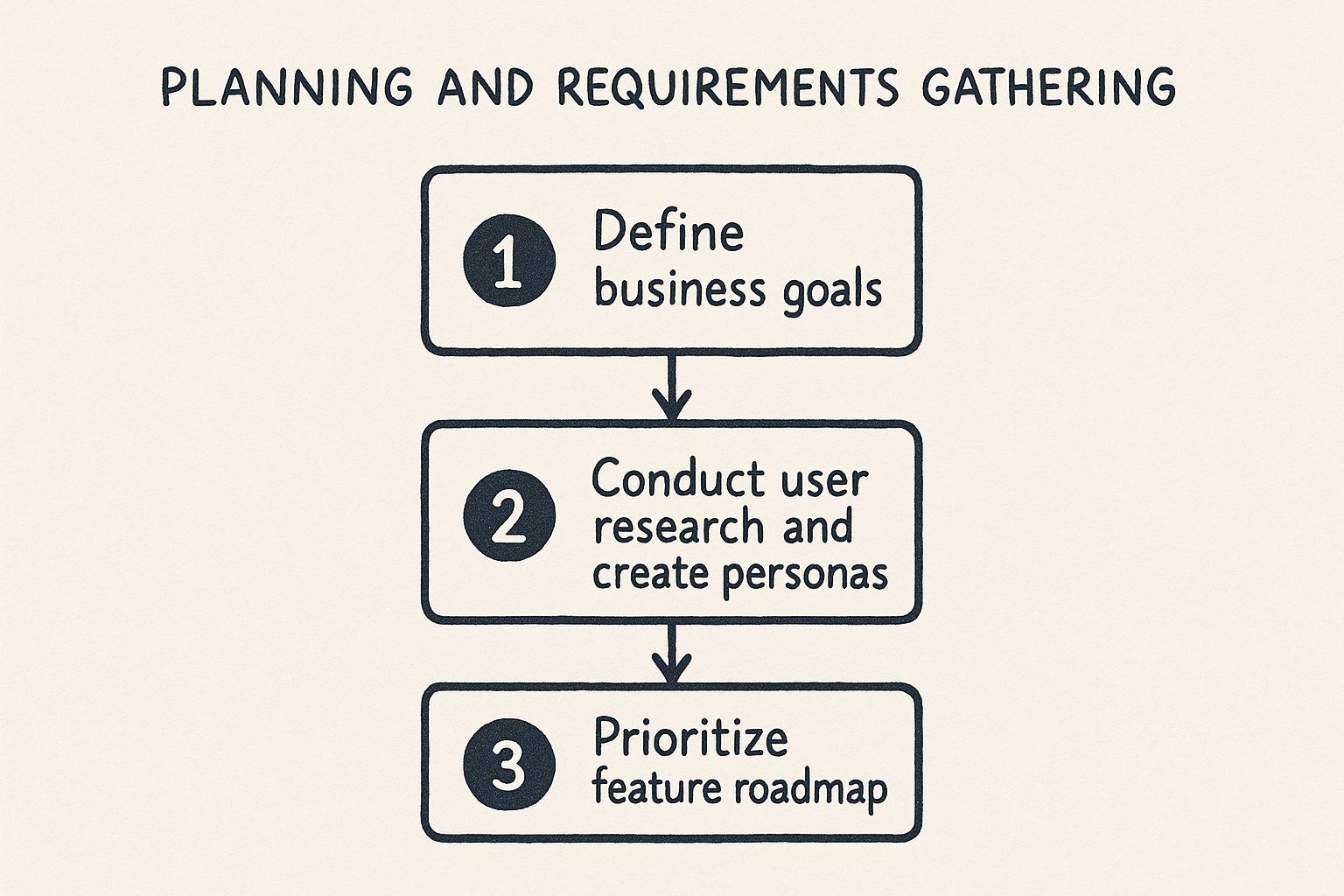
This visual roadmap highlights how a project moves from high-level business goals to a concrete feature plan, ensuring every decision from here on out is purposeful.
Stage 2: UI and UX Design
With a clear strategy in place, the focus shifts to the people who will actually use the application. This stage has two equally important sides of the same coin: User Experience (UX) and User Interface (UI).
- UX Design is the blueprint for the user's journey. It’s all about creating a logical, intuitive flow. UX designers create wireframes—think of them as skeletal outlines—to map out how a user will get from point A to point B to complete a task effortlessly.
- UI Design is what brings the application to life visually. This is where the app gets its personality and look. UI designers focus on colors, fonts, buttons, and all the interactive elements to create something that's not just easy to use, but also beautiful and aligned with your brand.
Practical Example: For an e-commerce checkout page, UX design determines the flow: cart review -> shipping details -> payment info -> final confirmation. UI design decides the button colors, the font size of the price, and the visual style of the input fields to make the experience feel secure and on-brand.
Stage 3: Development and Coding
Here's where the digital construction begins. With a solid blueprint and a polished design, the development team starts writing the code that turns those plans into a real, working application. This is often the longest phase and is typically split into two camps:
- Frontend Development: This is everything the user sees and interacts with. Developers use languages like HTML, CSS, and JavaScript to build out the user interface, making it look and feel just like the UI designs.
- Backend Development: This is the engine under the hood. It’s the server, the database, and all the application logic that you don't see. The backend is where data is stored, processed, and sent to the frontend to be displayed.
A great way to think about it is like a theater production. The frontend is the stage—the actors, the set, the costumes that the audience sees. The backend is everything happening behind the curtain—the lighting, sound controls, and stagehands that make the show run smoothly.
Stage 4: Testing and Quality Assurance
Let's be real: no application is perfect on the first try. That’s why the testing phase, also known as Quality Assurance (QA), is so critical. This is all about hunting down and squashing bugs before your users ever see them. It's a multi-layered process that ensures your application is stable, secure, and works exactly as intended.
Practical Example: For an event booking app, a QA tester would perform user acceptance testing (UAT) by trying to book a ticket with an expired credit card. The expected result is a clear error message. If the app crashes or processes the payment, the test fails, and the bug is sent back to developers for a fix. This real-world scenario testing is crucial.
Stage 5: Deployment and Maintenance
This is the big moment—when your application goes live and is officially available to the world. Deployment involves setting up servers, configuring the database, and pushing all the code to a live environment. But the work doesn't stop here.
Actionable Insight: Before deployment, create a simple post-launch plan. This should include who is responsible for monitoring uptime, a protocol for reporting bugs, and a schedule for the first round of feature updates based on initial user feedback. This turns maintenance from a reactive scramble into a proactive strategy.
Ongoing maintenance includes:
- Keeping an eye on performance and uptime.
- Applying security patches to fend off new threats.
- Fixing any bugs that slip through and emerge with real-world use.
- Adding new features based on user feedback and your evolving business needs.
Proper maintenance turns your custom web application from a one-time project into a valuable, long-term asset that keeps delivering a strong return on your investment.
Choosing Your Path: Custom App vs. Standard Software
Deciding between off-the-shelf software and a custom-built application is a major crossroads for any business. One path looks fast and affordable, while the other promises a perfect fit but requires a more considered journey. To make the right call, you have to look past a simple pros-and-cons list and figure out which option truly backs up your long-term business goals.
The heart of this decision isn't just about features. It’s about control, growth, and gaining a real edge over your competition. Standard software often forces you to bend your unique way of doing things to fit its pre-built box. In contrast, custom web application development builds the software around how you actually work—and how you want to work in the future.
This difference becomes crystal clear when you're trying to solve a specific, high-stakes problem that generic tools simply weren't built to handle.
A Practical Scenario: The Logistics Company
Let's imagine a mid-sized logistics company drowning in inefficiency. They’re using a standard, off-the-shelf tracking tool that shows where their trucks are, but that's about it. The software can't handle their complex multi-stop routes, adjust for real-time traffic, or track fuel efficiency—the very things that make or break their profitability.
Their team wastes hours every day manually plotting routes in different programs and relaying changes over the phone. The off-the-shelf tool ends up creating more work because it was never designed for their specific operational model.
Now, picture a custom solution. They invest in a custom web application development project to build a tool that does exactly what they need it to do:
- Optimized Routing: The custom app uses an algorithm to automatically map out the most fuel-efficient routes for all their multi-stop deliveries.
- Real-Time Updates: It pulls in live traffic data, instantly re-routing drivers around delays and notifying customers with an updated ETA.
- Integrated Communication: Drivers get route changes directly through the app, which means no more distracting phone calls or missed messages.
Sure, the initial investment was higher. But the return on that investment is obvious and easy to measure. They see a 20% reduction in fuel costs, a 15% boost in on-time deliveries, and dispatch errors have plummeted. The standard software saved them a little money upfront, but the custom solution is actively making them money every single day.
Comparison of Off-the-Shelf vs Custom Web Applications
To help you frame this decision for your own business, let’s break down how these two options stack up across the metrics that really matter to your bottom line. This isn't just about features; it's about business impact.
| Feature | Off-the-Shelf Software | Custom Web Application |
|---|---|---|
| Initial Investment | Lower upfront cost, often a recurring subscription fee. | Higher initial investment for development. |
| Long-Term ROI | Limited; value is capped by the software's features. | High; directly tied to solving specific business problems. |
| Scalability | Often restricted; you may outgrow it and need to switch. | Built to grow with your business, handling increased load. |
| Security | General security measures; may not meet specific needs. | Tailored security protocols to protect your specific data. |
| Customization | Very limited; you get what the vendor offers. | Unlimited; built exactly to your specifications. |
| Integration | Can be difficult and clunky with other business systems. | Designed for seamless integration with your existing tools. |
| Competitive Advantage | None; your competitors can use the exact same tool. | Significant; creates a unique operational advantage. |
This table makes it clear: the choice is about more than just immediate budget. It’s a strategic decision that affects your company's ability to innovate and compete.
Choosing a custom web application is an investment in a long-term asset. It becomes a piece of intellectual property that grows in value as it drives efficiency and creates a moat around your business that competitors can't easily cross.
Ultimately, the right path depends on the problem you’re solving. If you just need a basic tool for a generic task, off-the-shelf software can be a perfectly sensible choice. But when your core operations demand a solution that gives you a true competitive edge, a custom application is the clear strategic investment. A skilled development partner like Pixel One can help you analyze these trade-offs and build a tool that delivers lasting value.
Seeing Custom Development in Action
It’s one thing to talk about the theory behind custom web applications, but it's another thing entirely to see how they solve real-world problems. The true value clicks into place when you see a custom-built tool directly tackle a frustrating operational bottleneck and produce real business results.
Let's look at a few stories of businesses that went the custom route and gained a serious competitive edge. These examples show the journey from a nagging challenge to a powerful, purpose-built solution.
Healthcare From a Distance
A regional healthcare provider was struggling to serve patients with chronic conditions who couldn't easily travel. As the demand for remote care exploded, their problem became critical. Off-the-shelf telemedicine platforms just didn't cut it—they were too generic, lacked the robust security needed for HIPAA compliance, or wouldn't talk to their existing patient records system.
The answer was a HIPAA-compliant telemedicine platform built from scratch.
- Secure Video Consultations: The platform provided encrypted, high-quality video calls, ensuring patient privacy was locked down.
- EHR Integration: It synced perfectly with their Electronic Health Records, so doctors had a patient's full history at their fingertips during a call.
- Automated Scheduling: The system handled appointment reminders and follow-ups automatically, cutting patient no-shows by 30%.
The impact was immediate. The provider could now treat patients over a much larger area, which improved health outcomes and opened up a completely new revenue stream. This kind of specialized need is a huge driver in the web development market, which is expected to grow from USD 80.6 billion to USD 125.4 billion by 2030.
Slashing Waste in Manufacturing
A mid-sized manufacturing company was bleeding money every month from poor inventory management. Their patchwork system of spreadsheets and a generic inventory app couldn't track raw materials in real-time. This led to over-ordering, waste, and frustrating production delays when a key component was unexpectedly out of stock.
They decided to build a custom inventory management system tailored to their specific production workflow. The new application gave them a single dashboard with live data on every part, from the moment it hit the loading dock to its use on the factory floor.
The system even used predictive analytics to forecast material needs based on upcoming production runs, automatically flagging the purchasing team when stock ran low.
Within the first year, the company cut its material waste by over 25% and completely wiped out production stoppages from stockouts. The app paid for itself in just 18 months, turning a major headache into a streamlined part of their operation. For more insights on building effective business tools, feel free to explore our other articles at https://pixelonelabs.com/blog.
Boosting Sales with Personalization
An e-commerce brand selling customizable athletic gear was hitting a wall. Their standard product pages were clunky and couldn't give customers the highly visual, interactive experience they craved. Shoppers were stuck picking from dropdown menus, unable to see what their unique color and logo combinations would actually look like.
Their game-changing solution was a unique 3D product customizer built right into their website. This tool let customers design their gear in real-time, spinning a 3D model around and watching their changes appear instantly. Customers loved it.
The results were stunning:
- Conversion rates for customizable products shot up by 45%.
- The average order value grew by 20% as people added more custom touches.
- Customers started sharing their unique designs all over social media, creating a wave of free, authentic marketing.
As these stories show, custom web application development isn't about adding fancy features. It’s about building the exact tool you need to solve your biggest problems and deliver results you can measure.
Selecting the Right Tech Stack for Your App
Choosing the technology that powers your application—what we call the tech stack—can feel a bit like reading a foreign language. There are so many acronyms and competing options. The easiest way to think about it is to imagine you're building a restaurant. Your tech stack is made up of three core components that work together, just like the different parts of a restaurant.
https://www.youtube.com/embed/8eVXTyIZ1Hs
First, you have the backend, which is the restaurant's kitchen. This is where all the real work gets done behind the scenes. It includes the server, the application's logic, and all the systems that handle user requests and prepare data.
Next up is the frontend. Think of this as the dining room and the menu—it's everything your customer sees, touches, and interacts with. From the layout of the tables to the design of the menu and the buttons they press to order, the frontend is the user experience.
Finally, you have the database. This is the restaurant’s pantry. It's where all the essential ingredients (your data) are stored safely and organized efficiently, ready to be used by the kitchen whenever an order comes in.
Just as a chef picks specific ovens, pans, and ingredients to create a certain type of cuisine, developers choose specific technologies for each of these layers to build the exact application you need.
Decoding Popular Tech Stacks
You’ll often hear developers talk about stacks like "LAMP" or "MERN." These aren't just random words; they're popular combinations of technologies known to work really well together. Each one is a kind of pre-set kitchen, designed for a specific style of cooking.
- LAMP Stack: This is a classic, tried-and-true setup. It includes Linux (the operating system), Apache (the web server), MySQL (the database), and PHP (the programming language). Think of LAMP as a reliable, all-purpose commercial kitchen that’s been serving up great websites for decades. Best for: Content-heavy sites like WordPress blogs or straightforward e-commerce stores.
- MERN Stack: This is a more modern choice, popular because it uses a single language, JavaScript, for almost everything. It consists of MongoDB (a flexible database), Express.js (a backend framework), React (a frontend library), and Node.js (the backend environment). Best for: Dynamic single-page applications or platforms needing real-time data updates, like a social media feed or a live dashboard.
You don't need to become an expert on these overnight. The main point is that choosing a tech stack isn't about what's trendy—it's a strategic decision. It directly impacts your app's performance, how much it costs to build and maintain, and how easily it can grow in the future.
Making a Decision Based on Your Needs
The right tech stack for your custom web application development project boils down to your specific goals. Smart choices are based on practical needs, not industry buzz. To get to the right answer, ask your development partner these critical questions.
- Project Scope and Complexity: "Given that we need real-time inventory updates, which backend technology handles that most efficiently without driving up server costs?" This is more specific than just asking about complexity.
- Scalability: "If our user base triples in the next year, will this stack require a complete re-architecture, or can it scale by simply adding more server resources?" This forces a conversation about future-proofing.
- Speed to Market: "Are there any frameworks within this stack that offer pre-built components for standard features like user authentication? How much time will that save us?" This helps you understand how the stack impacts the timeline.
- Security: "Our application will handle payment information. What specific security features does this stack offer out-of-the-box to protect against common threats like SQL injection or cross-site scripting?"
Ultimately, picking a tech stack is a team sport. By asking targeted, practical questions, you can ensure the technology foundation of your app is a perfect match for your business goals. For those also considering native solutions, understanding the distinct requirements for a mobile app development company can provide additional valuable context.
Guiding Your Custom Development Project to Success
A brilliant idea for a custom web application is only as good as its execution. Moving from concept to a successful launch requires a steady hand to avoid the common pitfalls that can sink projects, bloat budgets, and stretch out timelines. Let's walk through the playbook for making sure your investment delivers the powerful tool your business needs, on time and on budget.

Managing a custom web application development project isn't about creating rigid, unchangeable plans. It's really about building a framework that has enough structure to keep things on track but is flexible enough to adapt when things inevitably change.
Adopt an Agile Methodology
One of the best ways to manage this balancing act is with the Agile methodology. Forget about building the entire application in one massive, long-haul phase. Instead, Agile breaks the project down into small, digestible cycles called "sprints." Each sprint, usually about two weeks long, is dedicated to building and delivering a small, functional piece of the final product.
Actionable Insight: At the end of each two-week sprint, insist on a live demo of the newly completed features. Don't just accept a status update. Actively click through the new functionality yourself. This hands-on approach allows you to provide immediate, tangible feedback and ensures the project never strays too far from your business goals. For teams working with outside partners, understanding the ins and outs of outsourcing product development is a crucial part of making these Agile processes click.
Establish Ironclad Communication
Clear, consistent communication is the lifeblood of a development project. So many delays and costly rework cycles are born from simple misunderstandings. You have to establish clear communication protocols right from the start.
Actionable Insight: Set up a dedicated Slack or Teams channel for the project and schedule a mandatory 15-minute stand-up meeting every other day. This creates a predictable rhythm for updates and prevents small questions from turning into major roadblocks. Also, designate a single "product owner" on your team who has the final say on feature decisions to avoid conflicting feedback.
Defend Against Scope Creep
"Scope creep" is the silent project killer. It’s what happens when new features and requests get tacked onto the project after it's already underway, often without adjusting the timeline or budget. While some changes are unavoidable, uncontrolled scope creep is a surefire way to miss deadlines and blow your budget.
Practical Example: The marketing team sees a demo and says, "This is great! Can we also add a live chat feature?" Instead of just saying yes, the project manager uses a formal change request process. They document the request, get an estimate from the developers (e.g., "This will add 3 weeks and $5,000 to the project"), and present it to the stakeholders. This allows for an informed business decision, not a knee-jerk addition. This process is what keeps your custom web application development project focused and on track.
Answering Your Top Questions About Custom Web App Development
If you're thinking about building a custom web application, you've probably got a few big questions on your mind. Getting clear answers upfront is the key to planning your investment wisely and knowing what to expect. Let’s walk through some of the most common questions we hear from business leaders just like you.
What's the Real-World Cost of a Custom Web App?
This is usually the first question, and the honest answer is: it depends. The cost can swing wildly based on how complex your idea is, but we can definitely map out some realistic budget ranges.
For a simple application with a focused set of features, such as an internal tool for tracking employee time off, you're likely looking at a starting point between $15,000 and $25,000. If you need something more involved, like an e-commerce platform or a customer portal that integrates with your CRM, the budget typically lands in the $25,000 to $85,000 neighborhood.
For truly large-scale enterprise systems with complex security needs and intricate business logic, like a custom fintech platform, the investment can easily go north of $85,000. These numbers aren't just for coding; they cover the whole journey—from strategy and design all the way through development, testing, and getting you launched.
How Long Does It Actually Take to Build?
Just like cost, the timeline is tied directly to the project's size and scope. A more straightforward app, like the time-off tracker example, can often be up and running in as little as 2 to 4 months.
A project with medium complexity, where we need to build and test a wider set of features, usually takes somewhere between 4 and 8 months. For the big, enterprise-level applications, you can expect a timeline of 8 to 12+ months because of their deep requirements and the critical need for exhaustive testing.
Actionable Insight: To get to market faster, focus on a Minimum Viable Product (MVP). Instead of building every feature you've ever dreamed of, identify the absolute core functionality that solves the user's biggest problem. Launch that first. This gets you real-world feedback quickly and allows you to build out the rest of the features based on actual user data, not just assumptions.
Who Owns the Code and Intellectual Property?
This is a non-negotiable point you need to get right with any development partner. For a standard custom development project, the answer should be simple: you, the client, own 100% of the intellectual property and the source code once the final bill is paid.
This is one of the biggest advantages of going custom—you're not just renting software, you're building a valuable, proprietary asset for your company. Actionable Insight: Ensure your contract includes a specific "Intellectual Property Assignment" clause that explicitly states all work product created for the project becomes your property upon final payment.
What Happens After Launch? What Kind of Maintenance Is Needed?
Getting your application live is a huge milestone, but it's not the finish line. To keep it secure, fast, and effective, you'll need ongoing maintenance. Think of it like a car—it needs regular check-ups to run well.
This usually involves a few key things:
- Regular Updates: Keeping all the underlying software components patched and secure.
- Performance Monitoring: Watching for slowdowns or server issues.
- Bug Fixes: Squashing any little issues that pop up once real users start interacting with the app.
- Feature Enhancements: Rolling out new functionality based on customer feedback and your evolving business goals.
A good rule of thumb is to budget about 15-20% of the initial development cost each year for maintenance. This ensures your investment continues to pay off for years to come. To see how a dedicated partner can help manage this, you can check out how we handle projects at https://pixelonelabs.com/.