
Decoding Mobile App Development Cost
Unlock the real mobile app development cost. Our guide breaks down key factors, budget drivers, and hidden expenses to give you an accurate estimate.So, how much does it actually cost to build an app? Let’s cut to the chase. You're looking at a spectrum that can start around $40,000 for a simple app and easily climb past $300,000 for something more complex.
Think of it like building a house. A straightforward, pre-designed floor plan will get you a solid, functional home. But if you start adding custom rooms, smart home technology, and high-end finishes, the price tag naturally goes up. The same logic applies directly to app development. For example, a simple "To-Do List" app is your standard floor plan, while an app like Uber, with real-time tracking and dynamic pricing, is the fully-customized smart home.
Your First Look at Mobile App Development Costs
Getting a handle on the costs is the first real step in turning your big idea into a tangible product. The price to build an app isn't just a number pulled from a hat; it’s a direct reflection of your project's scope—the features you need, the platforms you target, and the technology stack required to make it all work.
This is why mapping out a clear budget from the get-go is so critical. Every decision, from the initial design mockups to the final feature list, has a financial ripple effect. Actionable Insight: Start by creating a feature priority list. Divide features into "must-have" for launch, "nice-to-have," and "future updates." This gives you a clear roadmap for your Minimum Viable Product (MVP) and helps control initial costs.
Breaking Down Costs by Complexity
The easiest way to get a ballpark figure for your mobile app development cost is to figure out where your project falls on the complexity scale. A quick look at the global market shows just how wide the range can be, and it's almost always tied to the feature set.
A Simple App with a core set of features usually lands in the $40,000 to $60,000 range. Practical Example: Think of a basic QR code scanner or a tip calculator app. It performs one primary function, has a standard UI, and doesn't require a backend server.
A Mid-Complexity App, one that might include user accounts, social media integration, or payment processing, typically costs between $100,000 and $200,000. Practical Example: A local restaurant's ordering app with user profiles, a menu, Stripe integration for payments, and push notifications for order status would fit here.
A Complex App with advanced features like real-time data syncing, custom animations, and sophisticated back-end infrastructure can easily exceed $300,000. Practical Example: This is the territory of a fitness app with real-time workout tracking, video streaming, personalized AI-driven plans, and a community social feed.
Building an app is an investment in your business's future. The key is to match your budget to your primary business goals, ensuring every dollar spent delivers tangible value to your users and your bottom line.
To give you a clearer picture, let's create a quick summary table. This can help you visualize where your idea might land.
App Development Cost Estimates at a Glance
Here’s a quick-reference table that breaks down the typical costs and timelines you can expect based on your app's overall complexity.
| App Complexity | Estimated Cost Range | Typical Timeline |
|---|---|---|
| Simple | $40,000 - $60,000 | 2-4 Months |
| Moderate | $100,000 - $200,000 | 5-9 Months |
| Complex | $300,000+ | 9+ Months |
Keep in mind that these are just starting points. The final cost will always depend on the specifics of your project.
As you start planning your budget, partnering with an experienced mobile app development company is the best way to get a precise estimate tailored to your unique vision. They can help you refine your scope and ensure you're investing in the right features from day one.
Where Your Money Goes in the App Development Lifecycle
To really get a handle on the total mobile app development cost, you have to stop thinking of it as a single price tag. It's much more helpful to see it as a series of crucial investments, each one building on the last. Every stage in the development journey has a specific job to do, and knowing how to spread your budget across these phases is the secret to launching a great product without any nasty financial surprises.
It's tempting to cut corners on the early stages to save a few bucks, but I've seen that backfire time and time again. Skimping on planning almost always leads to expensive, frustrating fixes later on. Actionable Insight: Allocate your budget proportionally. A good rule of thumb is 10-15% for discovery, 20-25% for design, 40-50% for development, and 10-15% for testing and deployment.
The Discovery and Strategy Phase
Long before anyone writes a single line of code, the real work begins. This is the Discovery phase, and it’s where you kick the tires on your idea, figure out who you're building for, and pinpoint the exact problem your app is going to solve. Expect this stage to eat up about 10-15% of your total budget.
This initial investment is for the foundational stuff: market analysis, snooping on your competitors, and nailing down the feature set for your Minimum Viable Product (MVP). Practical Example: A startup building a new meditation app would use this phase to analyze Headspace and Calm, identifying a niche they could fill, such as "meditation for busy professionals." Research might reveal their target audience prefers 5-minute guided sessions over 30-minute ones, saving significant content production costs.
This flow chart shows how an idea gets turned into a real, working product, starting with gathering requirements.
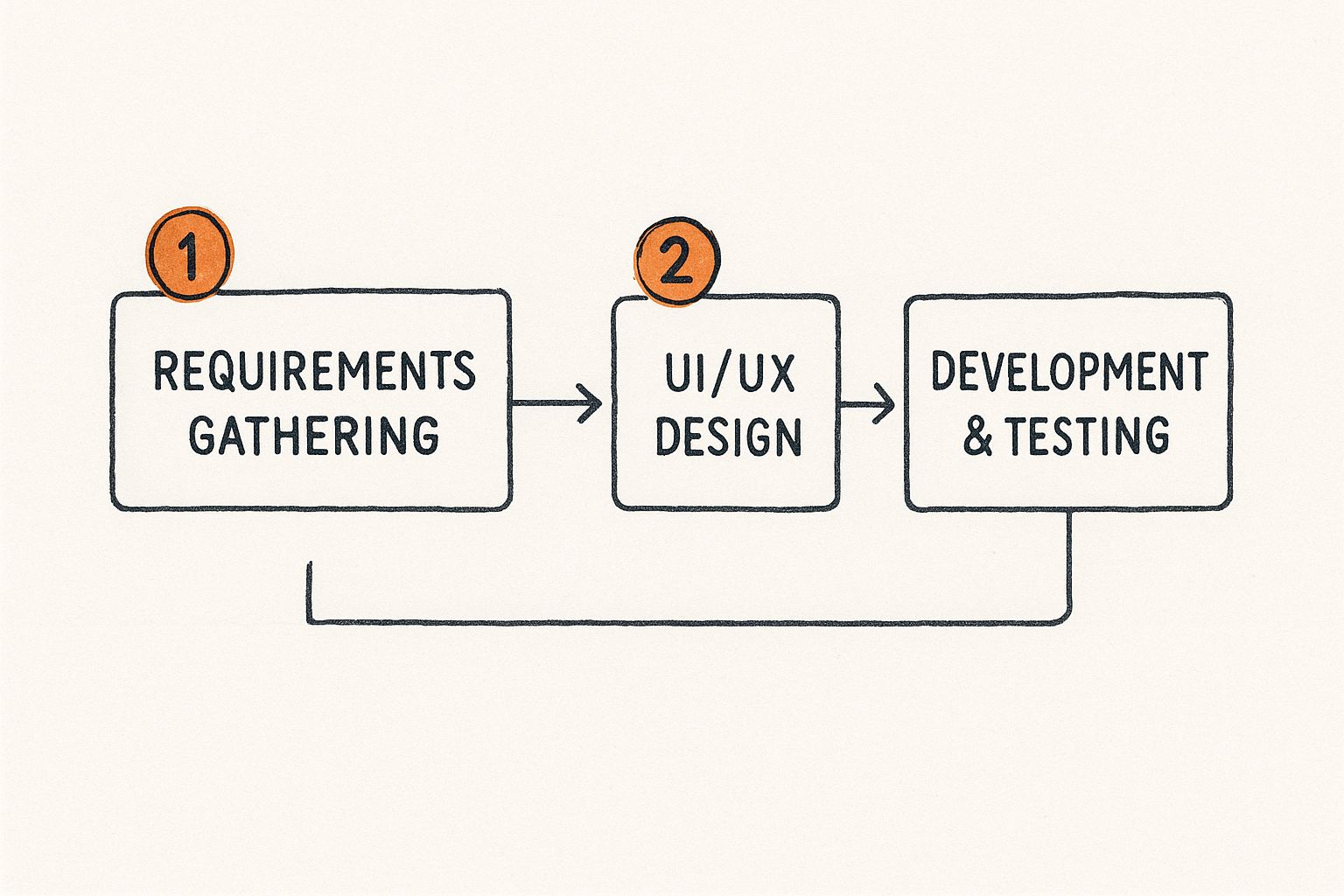
You can see how each step is built on the one before it. That’s why a solid foundation in these early stages is absolutely critical for a smooth ride through the rest of development.
UI/UX Design
Once the "what" and "why" are locked down, the focus shifts to how the app will look, feel, and work. The UI/UX Design phase is about so much more than making things look pretty; it’s about crafting a user journey that feels natural and keeps people coming back. This stage typically accounts for 20-25% of your budget.
This is where designers create wireframes—the basic screen layouts—and then build high-fidelity prototypes that let you click through the app as if it were real. Practical Example: For an e-commerce app, a clickable prototype could be tested with real users. If testers consistently struggle to find the "checkout" button, the designer can move it to a more prominent location before any code is written, saving potentially hundreds of dollars in development rework.
Good design is an investment, not an expense. An intuitive and visually appealing app directly impacts user retention and satisfaction, making this a critical area for budget allocation.
Development and Testing
Alright, this is the heavy-lifting part of the project where your app is actually built. The Development & Coding phase is the biggest slice of the pie, usually making up 30-40% of the total cost. During this stage, developers are busy writing the front-end code (everything the user sees and interacts with) and the back-end code (all the server-side magic that makes it work).
Let’s talk real numbers. The discovery phase often lands between $5,000 and $40,000. The design stage can range from $5,000 to $50,000. And for an app with a decent set of features, the development alone can cost $30,000–$80,000. Don't forget that post-launch maintenance will add another 15–20% of that initial cost every year.
Running in parallel with development is Testing & Quality Assurance. This is a non-negotiable step where the app is put through its paces to find bugs, performance hiccups, and usability issues on all kinds of devices. Actionable Insight: Budget for testing on a range of devices, not just the newest models. Your target audience might be using older phones, and ensuring your app works well for them is crucial for positive reviews. Understanding the complete process to develop an app makes it clear why every single one of these stages is essential for a successful launch.
The Core Factors That Drive Your App Budget
Trying to nail down the total mobile app development cost is a bit like planning a custom-built home. The final price tag depends entirely on the choices you make along the way. Think of your budget as a set of levers—every feature you add, design element you commission, or platform you target pulls a different lever, directly moving the cost up or down.
Knowing which levers have the biggest impact is the key. It lets you make smart trade-offs, putting your money where it will deliver the most value to your users and your bottom line. Let's break down the most significant cost drivers you'll encounter.
Feature Complexity and Scope
Without a doubt, the single biggest factor shaping your app's cost is its feature set. The math is simple: more features mean more development hours, and more hours mean a higher budget. But it's not just about the number of features; it's about their complexity.
Practical Example: A basic email and password login screen might take a developer 30-40 hours to build and test. But if you want a full-fledged authentication system with social logins (Google, Apple), two-factor authentication (2FA), and a secure password recovery flow, that could easily eat up 60-80 hours. The added complexity of integrating with multiple third-party services and ensuring security more than doubles the cost for that one "login" feature.
Here’s a practical way to think about how feature costs scale:
- Basic Features: These are the must-haves—things like user registration, push notifications, and a simple admin panel. Individually, these can range from $1,000 to $4,000.
- Moderate Features: This is where you get into integrations, like adding a payment gateway, a simple in-app chat, or maps. These often land between $3,000 and $8,000 per feature because they involve connecting to third-party services and writing more intricate code.
- Advanced Features: Now we're talking about the heavy hitters. Real-time data syncing for a messaging app, AI-powered recommendation engines, or custom video call functionality can send costs soaring, often past $15,000 for just one of these features. As a reference, building a stable video chat function can take 300-400 hours of dedicated development time.
Platform and Technology Stack
Another huge decision is which platform you'll target: iOS, Android, or both? If you choose to build a "native" app for each, you're essentially funding two separate projects. One team will write code in Swift for iOS, while another works in Kotlin or Java for Android. This approach delivers peak performance but effectively doubles your development costs right out of the gate.
Actionable Insight: If you're an early-stage startup, consider launching on a single platform first. Analyze your target market. If your ideal users are primarily iPhone owners, an iOS-only launch can validate your idea and generate revenue for less than half the cost of building for both platforms. You can always build the Android version later once the concept is proven.
Custom UI/UX Design
An app's look and feel are crucial for keeping users engaged, but they're also a major cost center. You can always use standard, out-of-the-box components provided by iOS and Android to get up and running quickly. However, creating a truly unique and memorable brand experience requires a custom design, and that takes time and expertise.
An app's design is not just what it looks like; it's how it works. Investing in a clean, intuitive user experience is essential for user adoption and can prevent costly redesigns in the future.
Here’s how the design costs typically break down:
- UX Design (User Experience): This is the blueprint. It involves user research, mapping out how people will navigate the app, and creating wireframes. This foundational work can start around $5,000.
- UI Design (User Interface): This is the visual layer—the color palette, icons, typography, and overall aesthetic. A professional, custom UI often ranges from $10,000 to $25,000.
- Branding & Animations: If you need a logo, custom illustrations, or slick animations to make your app pop, these will add to the design budget.
Actionable Insight: To manage costs, you could start with a design that heavily utilizes native UI elements (so your app looks like a standard iOS or Android app). This reduces custom design hours. Once your app gains traction and revenue, you can invest in a Version 2.0 with a more bespoke, branded interface. Bringing in one of the best UX design agencies early can help you find that perfect balance between a standout look and a sensible budget.
Third-Party Integrations and Backend Infrastructure
Apps today rarely live in a bubble. They need to talk to other services to be truly useful, and each of those connections adds another layer of complexity and cost.
Practical Example: Integrating with a payment gateway like Stripe isn't just a copy-paste job; it requires careful work to handle successful payments, failed transactions, refunds, and subscription logic, all while keeping user data secure. Each API integration can easily add $4,000 to $6,000 to your project. Other examples include integrating with the Google Maps API for location features or Twilio for sending SMS notifications.
On top of that, nearly every app needs a backend—the engine running behind the scenes. This is where your data is stored, users are managed, and all the core logic happens. A simple backend for a small app can be built fairly quickly, but if you're planning for growth, you'll need a robust, scalable infrastructure that can handle thousands of users at once. That requires a much bigger investment, not just in development but also in ongoing server and maintenance fees.
Choosing Between Native and Hybrid App Development
One of the first big decisions you'll make—and one that heavily influences your mobile app development cost—is the technical path you choose. Are you going to build two separate, specialized apps for iOS and Android, or will you create a single, flexible codebase that works on both? This decision between native and hybrid development is a classic balancing act of performance, cost, and time.
Think of it like buying a car. A native app is like a high-performance sports car engineered for the racetrack. A hybrid app is more like a top-of-the-line SUV—it's versatile, handles most terrains well, and costs less to own and operate.

The Case for Native Development
Going native means building two entirely different applications from the ground up: one for Apple’s iOS (using Swift) and another for Google’s Android (using Kotlin or Java). This is the gold standard if you're chasing peak performance and the absolute best user experience.
Because these apps are built specifically for one operating system, they can tap directly into the phone's core features with zero compromises. Practical Example: An augmented reality (AR) app that overlays furniture in a room needs lightning-fast access to the camera and motion sensors. Native development ensures the smoothest performance for such demanding tasks.
But, as you'd expect, this premium experience comes with a premium price tag. You're effectively running two separate development projects in parallel, which means you need two specialized teams and two codebases to maintain over time.
The Appeal of Hybrid and Cross-Platform Solutions
For those watching the clock and the budget, hybrid (or cross-platform) development is an incredibly smart alternative. Using a framework like React Native or Flutter, developers write code once and deploy it on both iOS and Android.
This "write once, run anywhere" model is a game-changer. It massively cuts down development time and can slash your initial investment. Practical Example: A content-focused app, like a simple news reader or a company's event schedule, doesn't need intense graphical performance. Building it with Flutter would allow you to launch on both the App Store and Google Play almost simultaneously, for roughly 60-70% of the cost of building two native apps.
The choice isn't just about cost—it's about aligning your technical strategy with your business goals. If raw performance and a seamless native feel are non-negotiable, native is the way. If speed-to-market and budget efficiency are your top priorities, hybrid is a powerful contender.
Native vs. Hybrid Development Cost and Performance Trade-offs
Choosing between native and hybrid isn't just a technical decision; it's a strategic one that impacts your budget, timeline, and the end-user experience. This table breaks down the key differences to help you weigh the pros and cons for your specific project.
| Factor | Native App (iOS & Android) | Hybrid App (Cross-Platform) |
|---|---|---|
| Initial Cost | Higher. Requires two separate development teams and codebases. | Lower. Single codebase reduces development hours and team size. |
| Development Time | Slower. Building and testing two distinct apps takes longer. | Faster. "Write once, deploy anywhere" approach accelerates timeline. |
| Performance | Excellent. Optimized for a specific OS, providing a fast, smooth UX. | Good to Very Good. Performance has improved greatly but can lag in intensive tasks. |
| User Experience (UX) | Superior. Follows platform-specific design guidelines perfectly. | Good. Aims for a consistent look but may not feel 100% native. |
| Access to Device Features | Immediate and full access to all hardware and OS features. | Access can be delayed or require plugins for the newest features. |
| Maintenance | More complex and costly. Two codebases to update and debug. | Simpler and more affordable. One codebase to maintain and update. |
Ultimately, the best choice depends on your priorities. If your app's success hinges on flawless performance and a premium feel, the investment in native is often worth it. If you need to validate an idea quickly and efficiently, a hybrid approach offers a powerful, cost-effective path to market.
How Your Team and Location Affect the Price Tag
The features and tech stack you choose are obviously huge factors in your mobile app development cost, but the "who" and "where" of your development team can be just as critical. The people actually building your app make up a huge chunk of the budget, and their home base can swing your total expenses by more than 50%.
Getting a handle on the different team structures and regional rate differences is key to making a smart financial decision. You're not just buying lines of code; you're really investing in a partnership that will bring your vision to life.
Assembling Your Dream Team
A solid app development team isn't just a bunch of coders. It’s a specialized crew where each member plays a vital role in making the project a success. A tiny project might see people wearing multiple hats, but a typical team looks something like this:
- Project Manager: Keeps the project on schedule and budget.
- UI/UX Designer: Designs the app's look, feel, and flow.
- Developers (iOS, Android, Backend): Write the actual code.
- QA Engineers: Test the app to find and fix bugs.
Actionable Insight: When you receive a quote from an agency, ask for a breakdown of the team composition and the hours allocated for each role. This transparency helps you understand if you're paying for a senior-level team (higher cost, more experience) or a junior one (lower cost, may require more oversight). A senior developer might solve a complex problem in 10 hours that would take a junior developer 30 hours, making the higher hourly rate a better value.
The Dramatic Impact of Geographic Location
Okay, this is where the numbers get really interesting. A developer's hourly rate is massively influenced by their local cost of living and the demand in their market. This creates a huge pricing gap around the world, giving you a powerful lever to pull when managing your budget.
Choosing a development partner isn't just about finding the lowest price—it's about finding the best value. A slightly higher hourly rate from a team with excellent communication and a strong portfolio is often a better long-term investment than the cheapest option available.
Let’s break down how these rates compare across the globe. The differences can be staggering and will fundamentally change the final cost of an identical project.
| Region | Average Hourly Rate | Key Characteristics |
|---|---|---|
| North America | $100 - $250 | Highest rates, access to top-tier talent, convenient for US-based companies. |
| Western Europe | $70 - $150 | Premium quality, strong design focus, high labor costs. |
| Eastern Europe | $30 - $70 | Excellent balance of high-quality technical skills and affordable rates. |
| Asia (India) | $20 - $50 | Most budget-friendly option with a vast pool of available developers. |
Practical Example: A project quoted at $150,000 by a US-based agency could potentially be completed for $50,000 - $70,000 by a similarly skilled team in Eastern Europe. For many startups, this cost difference is the deciding factor that makes their project financially viable. This makes exploring outsourcing product development a crucial step in the planning process.
How to Choose the Right Partner, No Matter Where They Are
A cheap hourly rate is worthless if the work is shoddy or the project derails. Whether you hire a local agency down the street or an offshore team halfway around the world, your vetting process has to be rock-solid.
Actionable Insight: Don't just look at their portfolio; ask for a technical deep dive. Request to speak with one of their lead developers for 30 minutes. Ask them how they would approach a key technical challenge for your app. Their answer will reveal their depth of knowledge and problem-solving skills far better than a sales pitch. Also, check their client reviews on platforms like Clutch or GoodFirms.
Budgeting for Hidden and Ongoing App Costs
Getting your app to launch is a monumental achievement, but it’s really just the starting line. Too many founders get blindsided by the costs that come after the initial build—the money required to keep an app running, secure, and relevant.
Think of it like buying a car. You don't just pay the sticker price and drive off into the sunset forever. It needs gas, regular oil changes, new tires, and the occasional repair. Your app is no different. It needs a dedicated budget for its own upkeep and growth once it's out in the wild.
Uncovering Post-Launch Expenses
To build a realistic financial plan, you have to look at the total cost of ownership, not just the upfront development invoice. Ignoring these recurring expenses can turn a great launch into a slow-motion financial disaster.
Actionable Insight: A good rule of thumb is to set aside 15-20% of your initial development cost for annual maintenance. So, if your app cost $100,000 to build, you should have a line item in your annual budget for $15,000 to $20,000 just to keep it running smoothly.
So, where does that money go?
- Essential Updates: When Apple releases iOS 18, you'll need to pay a developer to ensure your app doesn't crash on the new operating system.
- Server & Hosting Fees: Your AWS or Google Cloud bill will increase as you get more users. A small app might cost $50/month, but a popular app could easily cost thousands.
- Third-Party Service Subscriptions: Services for push notifications (Pusher), analytics (Mixpanel), or payment gateways (Stripe) all have usage-based pricing tiers.
- App Store Fees: The Apple App Store charges $99/year, and the Google Play Store has a one-time $25 fee.
The Cost of Staying Competitive
Just keeping the lights on isn't enough, though. A big slice of your ongoing budget needs to be earmarked for growth. After all, a brilliant app that no one knows about is just a passion project, not a business. This is where marketing and user acquisition come in.
Your launch budget is incomplete without a line item for marketing. The most successful apps treat user acquisition not as an afterthought but as a continuous, integral part of their operational strategy.
Practical Example: Budget for a small test campaign on social media (e.g., $1,000 on Instagram ads) to determine your Customer Acquisition Cost (CAC). If you find it costs $2 to get one user to download your app, you can then build a predictable marketing budget based on your growth goals. You also need to analyze user feedback and analytics to plan for Version 2.0, which might include the most-requested new feature from your initial users.
Your Top Questions About App Costs, Answered
Talking about money can be tricky, especially when it comes to something as complex as building an app. To give you a clearer picture and help you plan your budget, we've tackled some of the most common questions we hear from founders and product managers.
How Can I Get a Realistic Cost Estimate for My App?
The single best way to get a solid number is to create a detailed project brief. Think of it as the blueprint for your future app. The more thought you put into this document, the more accurately any development team can map out the required time, team, and resources.
Actionable Insight: Your project brief should include user stories. Instead of just listing "user login," a user story would say: "As a new user, I want to be able to sign up with my email or Google account so I can create a profile quickly." This level of detail eliminates ambiguity and helps developers provide a much more accurate estimate.
What's the Biggest Reason App Projects Go Over Budget?
Nine times out of ten, the culprit is scope creep. This is what happens when new features and "wouldn't it be cool if..." ideas get added to the project after development is already underway, without also adjusting the budget or timeline.
Scope creep is the silent budget killer. Each small addition feels manageable at the moment, but they stack up quickly, threatening to derail your entire financial plan and launch date.
Actionable Insight: Implement a formal change request process. Any new idea must be documented, estimated for cost and time, and formally approved before a developer starts working on it. This forces you to consciously evaluate if a new feature is worth the extra investment and potential launch delay. The best defense is to define your Minimum Viable Product (MVP) and stick to it religiously.
How Much Will It Cost to Add Features Later On?
Adding new functionality after your app is live is a totally normal and healthy part of growing your product. The cost, however, really depends on how well the app was built in the first place. If your app was designed with a scalable and modular architecture, adding a feature is like snapping a new LEGO block into place—it's relatively clean and efficient.
Practical Example: If your app was built to be modular, adding a new "dark mode" theme might be a straightforward task that only affects the UI layer, taking maybe 20-30 hours. However, if the code is a tangled mess ("spaghetti code"), changing colors could require hunting down and modifying hundreds of individual files, turning it into a 100+ hour nightmare. This is why a quality initial build saves you a fortune in the long run.
Ready to turn your app idea into a reality with a clear, predictable budget? Pixel One specializes in creating scalable digital products that deliver measurable results. Let's build your vision together.