
10 Essential Software Development Best Practices for 2025
Elevate your projects with our guide to 10 essential software development best practices. Learn actionable insights on CI/CD, TDD, and more.In the competitive world of digital innovation, writing code that simply works is no longer the benchmark for success. The true differentiator between a good product and a great one lies in the discipline, collaboration, and strategic foresight embedded within the development process itself. Implementing established software development best practices isn't about imposing rigid rules; it's about building a sustainable foundation for quality, scalability, and long-term maintainability. This approach prevents technical debt from accumulating, accelerates release cycles, and ultimately leads to a more resilient and valuable product.
This comprehensive guide moves beyond abstract theory to provide actionable insights and practical, real-world examples for 10 essential practices that elevate software creation from a craft into a robust engineering discipline. You will learn not just what to do, but how and why each practice contributes to a superior outcome. We will explore everything from establishing a solid Git workflow and implementing Test-Driven Development (TDD) to automating deployments with CI/CD and integrating security from day one with DevSecOps.
Whether you are a startup leader aiming for a powerful MVP, a product manager steering a complex project, or an enterprise executive driving digital transformation, these principles are your roadmap to building better software, faster. By embracing these methodologies, your team can enhance collaboration, improve code quality, and deliver products that consistently meet and exceed user expectations. The following sections will detail each practice, offering specific steps you can take to integrate them into your own software development lifecycle for measurable, impactful results.
1. Version Control and Git Workflow
Version control is the cornerstone of modern collaborative software development, acting as a historical ledger for your codebase. Systems like Git track every change, allowing teams to manage modifications, revert to previous stable states, and work on different features in parallel without overwriting each other's progress. Adopting a structured Git workflow is a fundamental software development best practice that prevents chaos and ensures a reliable, transparent development process.
This practice is essential for any project involving more than one developer. It creates a safety net, enabling developers to experiment with new features in isolated branches without risking the stability of the main codebase. For example, a developer adding a new payment gateway can work on a feature/stripe-integration branch for days without affecting the live main branch. If the new feature introduces a critical bug, the team can revert the merge with a single command, instantly restoring the previous stable state.

Why It's a Best Practice
A robust version control strategy provides traceability and accountability. Every change is linked to an author, a timestamp, and a specific purpose. This history is invaluable for debugging, as it allows teams to pinpoint exactly when a bug was introduced using commands like git bisect. It also facilitates parallel development, where multiple developers or teams can work on separate features simultaneously using branches. These branches are later merged back into the main line of code, streamlining the development cycle and accelerating release schedules.
Actionable Implementation Tips
To effectively implement version control, adopt a standardized workflow and adhere to strict commit discipline.
Choose a Workflow: Select a branching strategy that fits your team's needs. GitFlow is excellent for projects with scheduled releases, using separate branches for features, releases, and hotfixes. For teams practicing continuous delivery, a simpler trunk-based development model, where developers merge small, frequent changes into a single
mainbranch, is often more efficient.Adopt Clear Conventions:
- Branch Naming: Use a consistent prefix system, such as
feature/user-authenticationorbugfix/login-error, to make branch purposes immediately clear. This helps in filtering branches and understanding ongoing work at a glance. - Commit Messages: Write meaningful commit messages in the imperative mood (e.g., "Add user login endpoint" instead of "Added a new endpoint"). A practical format is a short summary line, followed by a blank line and a more detailed explanation if needed.
- Atomic Commits: Each commit should represent a single, complete logical change. For example, a commit to add a new API endpoint should include the route, controller logic, and initial tests, but not unrelated UI changes. This makes your work easier to review and, if necessary, revert.
- Branch Naming: Use a consistent prefix system, such as
By integrating these version control habits, your team can build a more stable, maintainable, and collaborative development environment.
2. Test-Driven Development (TDD)
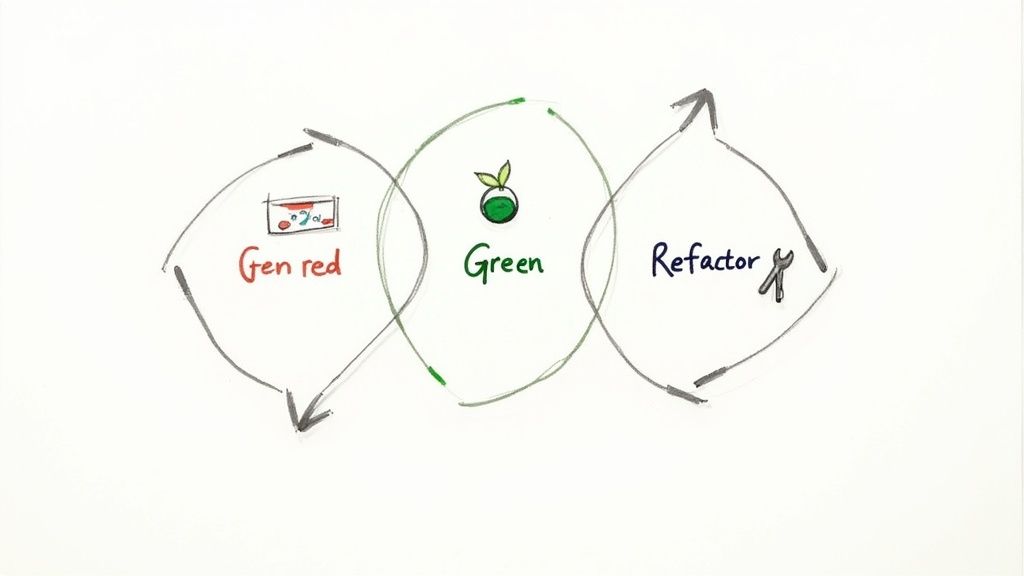
Test-Driven Development (TDD) is a software development methodology that inverts the traditional coding process by requiring developers to write tests before writing the functional code. The cycle follows three distinct steps: first, write a failing automated test for a new feature (Red); second, write the minimal code necessary to make the test pass (Green); and finally, refactor the new code to improve its structure and quality while ensuring all tests still pass (Refactor). Adopting TDD is a powerful software development best practice that enforces quality and functionality from the ground up.
This approach ensures every line of code is testable by design and directly addresses a specified requirement. For example, when building a password validation function, a developer would first write a test case like test_password_is_invalid_if_less_than_8_chars. This test would fail. Then, they write just enough validation logic to make it pass. This discipline forces clarity of thought and results in simpler, more focused code. This is particularly valuable in complex projects and is a cornerstone of agile methodologies like Extreme Programming.
Why It's a Best Practice
TDD provides a living specification for your code through its comprehensive test suite. These tests act as executable documentation, clearly defining how each component is intended to behave. This process significantly reduces bugs by catching them early in the development cycle, when they are cheapest to fix. It also builds a safety net for refactoring, giving developers the confidence to improve code structure or add new features without fear of breaking existing functionality. The resulting codebase is more modular, loosely coupled, and easier to maintain.
Actionable Implementation Tips
To successfully integrate TDD, focus on the rhythm of the Red-Green-Refactor cycle and maintain strict discipline.
Start with the Simplest Case: Begin by writing a simple, obvious test that will fail. This helps build momentum and ensures you understand the core requirement before tackling more complex logic. For instance, when building a calculator's
addfunction, the first test should betest_add_zero_and_zero_returns_zero.Adopt Clear Conventions:
- Descriptive Test Names: Name your tests to describe the behavior they are verifying, such as
test_calculates_sum_of_two_positive_numbers. This makes the test's purpose immediately clear when it fails. - Test Behavior, Not Implementation: Focus your tests on what the code should do, not how it does it. For example, test that
user.is_active()returnstrue, not that theuser.statusproperty is set to1. This prevents tests from breaking every time you refactor internal logic. - Keep the Refactor Step: Do not skip the refactoring phase. This is where you clean up code, remove duplication, and improve design, transforming functional code into high-quality code. Just as an MVP requires refinement, code in TDD needs this crucial step. You can learn more about building a strong foundation from the start in our guide on MVP development for startups.
- Descriptive Test Names: Name your tests to describe the behavior they are verifying, such as
By practicing these TDD habits, your team can produce a more reliable, well-documented, and resilient codebase.
3. Continuous Integration and Continuous Deployment (CI/CD)
Continuous Integration and Continuous Deployment (CI/CD) automates the software delivery pipeline, transforming it from a slow, manual process into a rapid and reliable workflow. Continuous Integration (CI) is the practice of frequently merging developers' code changes into a central repository, where automated builds and tests are run. Continuous Deployment (CD) extends this by automatically deploying all code changes that pass the testing stage to a production environment. Adopting CI/CD is a critical software development best practice for increasing development velocity and reducing human error.
This practice is essential for modern, agile teams aiming to deliver value to users faster. For example, every time a developer pushes code to a feature branch, a CI server like GitHub Actions automatically runs all unit and integration tests. If the tests pass, the developer knows their changes are safe to merge. Once merged to the main branch, the CD process can automatically deploy the new version to a staging environment for final review, or even directly to production.
Why It's a Best Practice
A mature CI/CD pipeline delivers accelerated release cycles and improved code quality. By automating the build and test phases, developers receive immediate feedback on their changes, allowing them to catch and fix bugs early before they become complex integration nightmares. This automation also frees up developers from manual deployment tasks, allowing them to focus on writing code and building features. The result is a more efficient development process that can release smaller, incremental updates safely and frequently.
The following infographic illustrates the core, simplified process flow of a CI/CD pipeline, from code commit to production deployment.
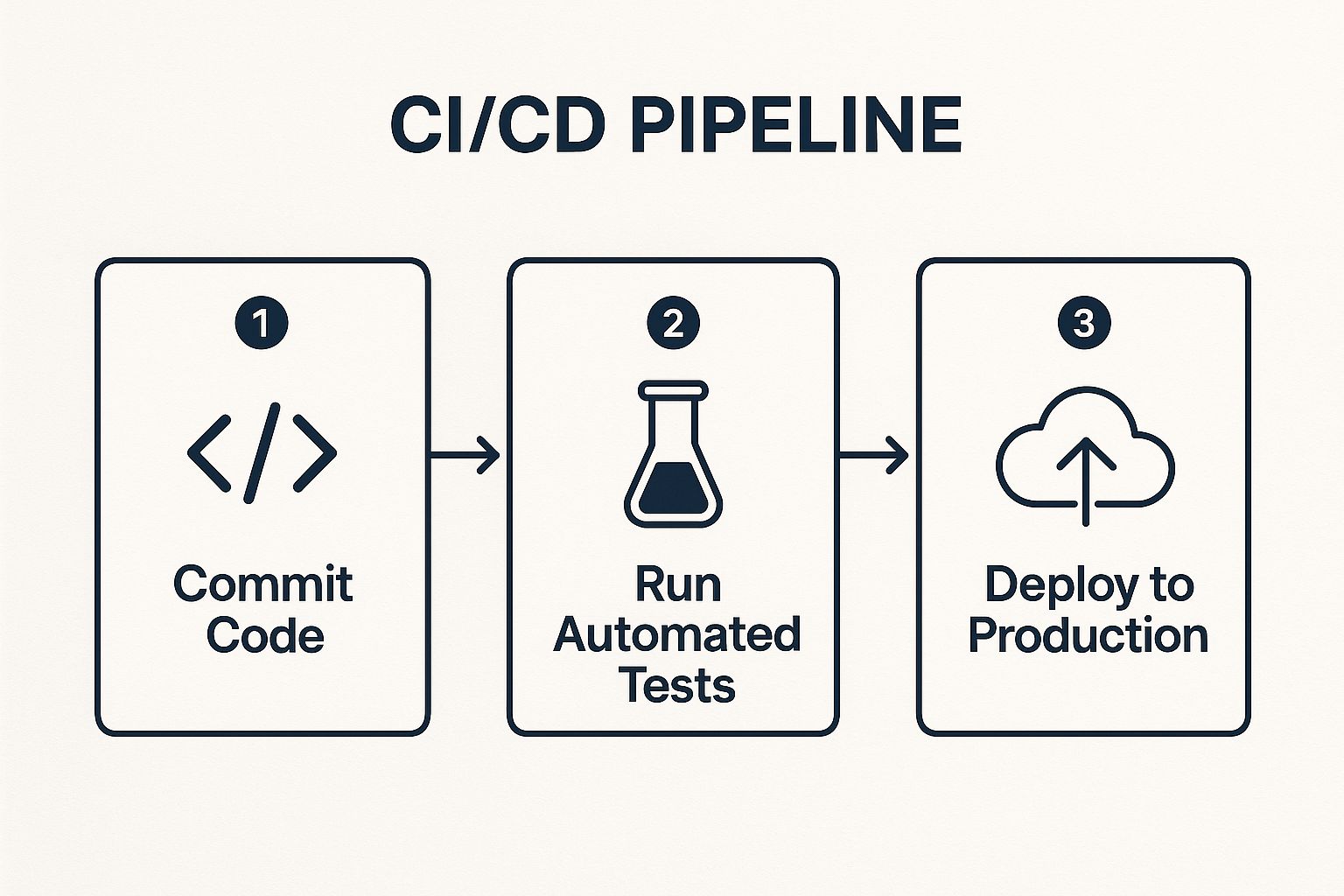
This visual representation shows how automation connects each stage, creating a repeatable and predictable path for code to reach users.
Actionable Implementation Tips
To effectively implement CI/CD, start small and build a culture of automation and rapid feedback.
Choose a CI/CD Tool: Select a platform that fits your technology stack and team size. GitHub Actions is excellent for projects already hosted on GitHub, offering seamless integration. Jenkins is a highly flexible, open-source option, while GitLab CI/CD provides a powerful, all-in-one solution.
Adopt Automation Best Practices:
- Start Small: Begin by creating a pipeline that only runs your unit tests on every commit. Once that is stable, add a build step, then integration tests, and finally a deployment step.
- Keep Builds Fast: Aim for feedback within 10 minutes. A fast build encourages developers to run it often and keeps the feedback loop tight. Use caching for dependencies and parallelize test execution to speed things up.
- Fix Broken Builds Immediately: A broken build in the
mainbranch should be a top priority for the entire team to fix. This "stop-the-line" mentality prevents integration issues from piling up. - Use Feature Flags: Decouple deployment from release using feature flags. This allows you to deploy new, unfinished code to production safely behind a flag, enabling testing in a real environment without exposing it to users.
4. Code Review and Pair Programming
Enhancing code quality before it enters production is a critical software development best practice that saves time and prevents future technical debt. Code review, the systematic peer examination of source code, and pair programming, where two developers collaborate on a single workstation, are two powerful techniques to achieve this. They foster a culture of collective ownership, improve knowledge sharing, and catch bugs, security vulnerabilities, and design flaws early in the cycle.
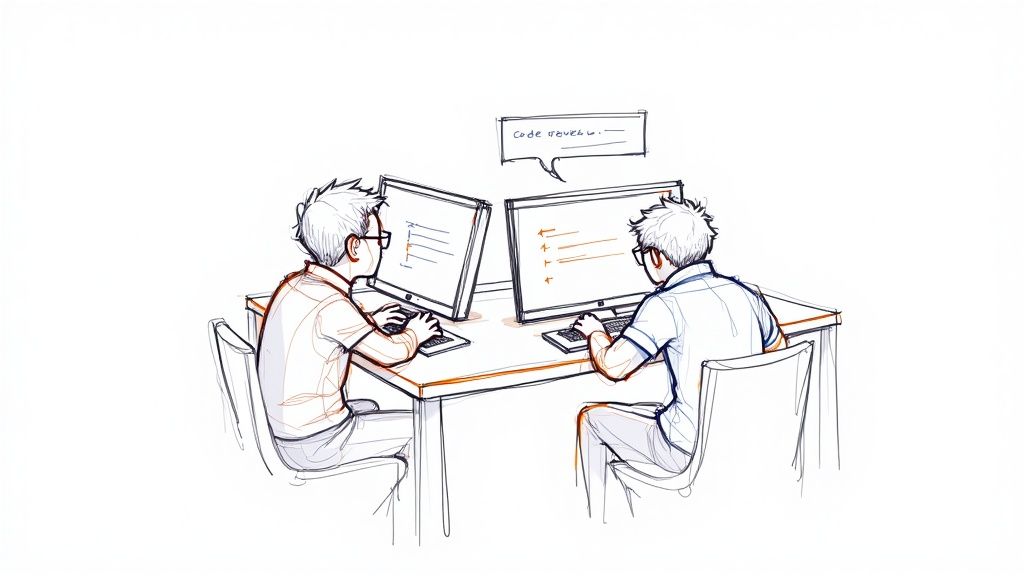
These collaborative practices are proven to be effective at any scale. For example, during a code review, a senior developer might spot a potential SQL injection vulnerability in a junior developer's code and suggest using a parameterized query instead. In a pair programming session, two developers can brainstorm the best way to design a complex algorithm, catching logical flaws in real time and producing a better solution than either could have alone. These approaches turn code creation from a solitary activity into a team-centric process.
Why It's a Best Practice
The primary benefit of these practices is a significant improvement in code quality. A second set of eyes can spot logical errors, edge cases, and architectural inconsistencies that the original author might have missed. This process also facilitates knowledge transfer across the team, as developers learn new techniques, patterns, and areas of the codebase from their peers. It creates a mentoring environment where junior developers can learn from seniors, and seniors can gain fresh perspectives, reducing knowledge silos and bus factor.
Actionable Implementation Tips
To integrate these practices, focus on creating a constructive and efficient feedback loop that respects everyone's time and contributions.
Establish a Code Review Culture:
- Keep Pull Requests Small: Aim for pull requests under 400 lines of code. A developer is more likely to give a thorough review to a small, focused change than a massive one.
- Automate Style Checks: Use tools like Prettier, ESLint, or RuboCop to automatically format code and check for style issues. This lets reviewers focus on crucial aspects like logic and design, not on comma placement.
- Provide Constructive Feedback: Frame comments as questions ("Have you considered what happens if this input is null?") rather than demands ("Fix this."). Remember to praise good solutions, not just point out flaws.
Implement Effective Pair Programming:
- Define Roles and Rotate: Use the driver (writes code) and navigator (reviews and thinks ahead) model. Switch these roles every 30 minutes using a timer to keep both participants engaged.
- Know When to Pair: Use pair programming for complex problems, critical features, or when onboarding a new team member to a specific part of the codebase. Simpler, routine tasks may not require the overhead of pairing.
- Be Flexible: For distributed teams, use tools like VS Code Live Share or Tuple for remote pairing. Asynchronous code reviews remain a great alternative when real-time collaboration isn't feasible.
5. Agile and Iterative Development
Agile is a software development philosophy that prioritizes iterative progress, continuous feedback, and adaptability over rigid, upfront planning. Instead of building an entire product in one long cycle, agile breaks work into short, time-boxed iterations called "sprints." At the end of each sprint, typically lasting one to four weeks, the team delivers a small, functional piece of the product, allowing for regular adjustments based on stakeholder input. This approach is one of the most transformative software development best practices because it enables teams to respond to change rather than follow a static plan.
This methodology is essential for projects where requirements are expected to evolve. For example, a team building a new mobile app might deliver a login feature in Sprint 1 and a basic profile page in Sprint 2. After getting feedback on the profile page, they might realize users want a different layout, a change they can easily accommodate in Sprint 3. This is far more efficient than discovering the same issue after six months of development in a traditional waterfall model.
Why It's a Best Practice
Adopting an agile framework provides increased flexibility and customer satisfaction. By delivering working software in frequent, small increments, teams can gather real-world user feedback early and often. This continuous feedback loop ensures the final product aligns closely with user needs and market demands, reducing the risk of building the wrong thing. It also promotes transparency and predictability, as stakeholders have clear visibility into the project's progress at the end of every sprint. The iterative nature of the digital product development process makes it easier to manage priorities and adapt to new information.
Actionable Implementation Tips
To effectively implement agile, start with a core framework and commit to its principles, especially the feedback-driven ceremonies.
Choose a Framework: Begin with a well-defined framework like Scrum, which is structured around roles (Product Owner, Scrum Master, Development Team) and ceremonies (Sprint Planning, Daily Stand-up, Sprint Review, Retrospective). Alternatively, Kanban offers a more continuous flow model, focusing on visualizing work and limiting work-in-progress, which is great for teams managing support tickets or unpredictable workflows.
Embrace the Ceremonies:
- Consistent Sprints: Keep sprint lengths consistent, with two weeks being a common and effective cadence. This creates a predictable rhythm for planning and delivery.
- Empower the Product Owner: Ensure the Product Owner has the authority to prioritize the backlog. They are the single voice for stakeholders, preventing developers from getting conflicting requests.
- Value Retrospectives: Treat the sprint retrospective as a critical opportunity for process improvement. Instead of just talking, create concrete action items, like "We will write API documentation before the front-end work begins," and assign an owner to each.
- Focus on Working Software: The primary measure of progress in agile is a functional, demonstrable product increment. A demo of a working feature in the Sprint Review is far more valuable than a status report.
6. Clean Code and Refactoring
Writing code that works is only the first step; writing code that is understandable, maintainable, and easy to modify is what separates professionals from amateurs. Clean code, a concept popularized by Robert C. Martin, is a software development best practice focused on readability and simplicity. It is complemented by refactoring, the disciplined process of restructuring existing code, as detailed by Martin Fowler, to improve its internal design without altering its external behavior. Together, they combat technical debt and ensure long-term project viability.
This philosophy is critical for the longevity of any software project. For example, a function named processData() is vague, but a function named calculateTaxForOrder(order) is immediately understandable. Similarly, refactoring might involve taking a 100-line function with multiple nested if statements and breaking it down into several smaller, single-purpose helper functions. The result is code that is easier to read, test, and debug.
Why It's a Best Practice
Clean code directly reduces the cognitive load on developers, making it easier to debug, extend, and onboard new team members. It creates a sustainable and scalable codebase. As features are added and requirements change, a clean architecture allows the system to evolve gracefully rather than collapsing under its own complexity. Regular refactoring is the mechanism that maintains this cleanliness, preventing the gradual decay that leads to "software rot" and expensive rewrites.
Actionable Implementation Tips
To cultivate a culture of clean code and effective refactoring, integrate these habits into your team's daily workflow.
- Follow the "Boy Scout Rule": As coined by Robert C. Martin, always leave the code a little cleaner than you found it. If you're working in a file and see a poorly named variable, rename it. If you see a block of duplicated code, extract it into a function. These small, continuous improvements prevent the accumulation of technical debt.
- Embrace Naming Conventions:
- Meaningful Names: Use variable and function names that clearly describe their purpose. A practical example:
elapsedTimeInDaysis better thand. Use boolean variables likeisCompleteorhasError. - Avoid Disinformation: Don't use names that are misleading. A variable named
accountListshould be a List, not another data type like a Map or an Array.
- Meaningful Names: Use variable and function names that clearly describe their purpose. A practical example:
- Keep Functions Small and Focused:
- Single Responsibility: Each function should do one thing and do it well. For example, a function that validates user input should not also save it to the database.
- Avoid Deep Nesting: Use guard clauses (early returns) to handle error conditions at the start of a function. This flattens the logic and makes the "happy path" easier to read.
- Delete Commented-Out Code: Don't leave old code commented out. Your version control system (like Git) keeps a complete history. Dead code just adds noise and confusion.
7. Documentation and Knowledge Management
Documentation is the practice of creating and maintaining written records of software architecture, design decisions, APIs, and usage instructions. Far from being an afterthought, it is a critical component of a healthy codebase, bridging the gap between complex code and human understanding. Effective documentation acts as a knowledge repository, ensuring that vital information is not lost when team members change roles or leave the project.
This practice is essential for scaling teams and ensuring long-term maintainability. A practical example is a well-documented API. Instead of a developer having to read the source code to understand how to call an endpoint, they can refer to clear documentation that shows the required parameters, expected response formats, and provides example requests. Another example is an architectural decision record (ADR) that explains why the team chose to use a PostgreSQL database over MySQL, capturing the context for future developers.
Why It's a Best Practice
Well-maintained documentation provides clarity and context. While code tells you what the system does, documentation explains why it does it that way. This context is invaluable for future maintenance, debugging, and feature development. It also promotes collaboration and efficiency by creating a single source of truth that reduces repetitive questions and minimizes misunderstandings. By externalizing knowledge from individual developers' heads into a shared resource, teams can build a more resilient and scalable development culture.
Actionable Implementation Tips
To effectively implement documentation, treat it as an integral part of your development lifecycle, not a separate task to be completed later. The process to develop an app should include documentation at every stage.
Keep Documentation Close to the Code: Store documentation for APIs, components, and libraries within the same source code repository. This makes it easier to keep docs updated alongside code changes and include documentation review as part of the pull request process.
Automate and Standardize:
- Generate Docs from Code: Use tools like Swagger/OpenAPI for APIs, JSDoc for JavaScript, or Sphinx for Python to automatically generate documentation from code comments and annotations. This ensures the documentation stays in sync with the code.
- Write the README First: For a new microservice or library, write a README file that explains its purpose, how to install it, and how to run its tests before writing the implementation. This forces clarity of thought and acts as a mini-specification.
- Document the "Why": Focus on documenting architectural decisions, trade-offs, and the reasoning behind complex logic. The code itself shows what is happening, but only documentation can explain the "why." Use a simple markdown file in a
docs/adrfolder to track these decisions.
By integrating these documentation habits, your team can build a more sustainable, transparent, and efficient software development practice.
8. Automated Testing and Test Pyramid
Automated testing is the practice of writing code to verify the correctness of your application code, creating a repeatable, reliable, and fast feedback loop. This safety net allows for confident refactoring and feature development. The Test Pyramid, a concept popularized by Mike Cohn, is a strategic framework for organizing these tests, advocating for many fast, isolated unit tests at the base, fewer service-level integration tests in the middle, and a minimal number of slow, comprehensive end-to-end tests at the top.
This software development best practice is critical for maintaining quality at scale. For example, an e-commerce application would have hundreds of unit tests for functions like calculateShippingCost(). It would have fewer integration tests to verify that the ShoppingCart service can correctly communicate with the Product service. Finally, it would have only a handful of end-to-end tests that simulate a full user journey, such as adding an item to the cart, checking out, and completing payment.
Why It's a Best Practice
A well-structured automated testing strategy provides confidence and velocity. By catching regressions automatically, developers can push new code with the assurance that they haven't broken existing functionality. This rapid feedback cycle is essential for agile development and continuous integration. Following the Test Pyramid model optimizes for speed and cost-effectiveness, as unit tests are cheap to write and execute instantly, providing the majority of test coverage. This structure prevents teams from relying too heavily on slow, brittle, and expensive end-to-end tests.
Actionable Implementation Tips
To implement a successful automated testing culture, focus on the test pyramid strategy and maintain your tests with the same discipline as your production code.
Follow the Test Pyramid: Prioritize writing a large suite of unit tests that cover individual functions and classes in isolation. Add a smaller number of integration tests to verify that components work together correctly, for example, checking if your API layer correctly fetches data from the database. Reserve slow end-to-end (E2E) tests for critical user workflows only, like the user registration or checkout process.
Adopt Clear Conventions:
- Keep Tests Fast: The entire unit test suite should run in seconds, or a few minutes at most. Slow tests discourage frequent use and delay feedback.
- Test Behavior, Not Implementation: Focus tests on the expected outcomes (the "what"), not the internal logic (the "how"). This makes tests less brittle and easier to maintain when refactoring.
- Use Descriptive Names: A test named
test_should_return_error_if_password_is_too_shortis far more useful thantest_user_validation_1. - Mock External Dependencies: In unit tests, use mocks or stubs to isolate your code from external systems like databases, third-party APIs, and the file system. This ensures tests are fast, reliable, and don't depend on external services being available.
By building a robust and balanced test suite, your team can accelerate development, reduce bugs, and deploy new features with confidence.
9. Modular Architecture and Design Patterns
Modular architecture is the practice of organizing a software system into independent, interchangeable components, each with a specific responsibility and a well-defined interface. This approach is complemented by design patterns, which are proven, reusable solutions to commonly occurring problems within software design. Together, these principles create systems that are easier to understand, test, modify, and scale by promoting loose coupling and high cohesion.
This software development best practice is critical for managing complexity in large-scale applications. For example, an e-commerce platform could be built with separate modules for UserManagement, ProductCatalog, and OrderProcessing. Each module can be developed and deployed independently. If the ProductCatalog team wants to switch to a new database, they can do so without impacting the OrderProcessing module, as long as the API contract between them remains the same. This is a practical application of loose coupling.
Why It's a Best Practice
Adopting a modular architecture significantly enhances maintainability and scalability. When components are independent, a bug fix or feature update in one module doesn't risk breaking others. This separation of concerns allows teams to work on different parts of the system in parallel, accelerating development. It also makes the system easier to scale, as individual components can be scaled up or down based on demand. For those interested in building robust, scalable systems, custom web application development often relies heavily on these principles.
Actionable Implementation Tips
To implement a modular architecture effectively, focus on clear boundaries and strategic application of patterns.
Align Modules with Business Domains: Structure your components around business capabilities, not technical layers. Instead of
Controllers,Models, andViewsfolders at the top level, create modules forOrders,Payments, andInventory. This approach, central to Domain-Driven Design (DDD), ensures the architecture reflects the business logic.Apply SOLID Principles and Patterns Judiciously:
- SOLID Principles: Use these five design principles as a guide. For example, the Single Responsibility Principle means a
Userclass should handle user data, not also email notifications. - Dependency Injection (DI): Instead of a service creating its own database connection (e.g.,
db = new DatabaseConnection()), pass the connection in as a parameter. This decouples the service from a specific database implementation, making it easier to test and swap dependencies. - Avoid Over-Engineering: Don't apply a design pattern just because you can. Adhere to the "You Aren't Gonna Need It" (YAGNI) principle. For instance, don't implement a complex caching strategy until performance measurements show it's necessary. Start simple and refactor toward a pattern as the system evolves.
- SOLID Principles: Use these five design principles as a guide. For example, the Single Responsibility Principle means a
10. Security Best Practices and DevSecOps
Integrating security into the software development lifecycle from the outset, rather than treating it as a final check, is a critical modern practice. DevSecOps formalizes this "shift-left" mentality by embedding security practices directly into the automated CI/CD pipeline. This proactive approach involves secure coding standards, automated dependency scanning, and continuous security monitoring to build resilient software without sacrificing development speed.
This methodology is essential for protecting user data and maintaining brand trust. A practical example is adding an automated tool like Snyk or Dependabot to your CI pipeline. This tool will automatically scan your project's third-party libraries on every commit and fail the build if a known vulnerability is found, forcing developers to address it before the code can be merged. This is much cheaper and safer than discovering the vulnerability after it has been deployed to production.
Why It's a Best Practice
A DevSecOps approach fundamentally reduces risk and cost. By identifying and fixing vulnerabilities early in the development cycle, teams avoid expensive and complex patches after deployment. This practice fosters a culture of shared responsibility, where security is not just one team's job but an integral part of every developer's workflow. It ensures security keeps pace with rapid development cycles, enabling teams to release features quickly and safely. Adhering to these software development best practices is non-negotiable for building trustworthy products.
Actionable Implementation Tips
To effectively implement DevSecOps, integrate automated tools into your pipeline and establish clear security guidelines for your team.
Automate Security Scanning: Integrate tools directly into your CI/CD pipeline. Use static application security testing (SAST) tools like SonarQube to scan your source code for common bugs like SQL injection. Employ dependency scanning tools like GitHub's Dependabot to automatically detect and create pull requests to update vulnerable third-party libraries.
Establish Secure Coding Standards:
- Follow OWASP Top 10: Use the OWASP Top 10 list as a practical checklist for your team. For example, ensure all database queries are parameterized to prevent SQL injection.
- Manage Secrets Securely: Never commit credentials, API keys, or other secrets to version control. Use a secrets management tool like HashiCorp Vault or the built-in secrets stores of cloud providers like AWS Secrets Manager. Load them as environment variables at runtime.
- Enforce Least Privilege: A service that only needs to read from a database should use credentials with read-only access. This limits the damage that can be done if the service is compromised.
- Sanitize All Inputs: Treat all external data—from user form submissions to API responses—as untrusted. Validate, sanitize, and encode data appropriately to prevent injection attacks like Cross-Site Scripting (XSS). For more specific guidance, you can learn more about mobile app security best practices.
By embedding these security-focused habits into your development process, you create a more robust and defensible application from the ground up.
10 Software Development Best Practices Comparison
| Item | Implementation Complexity | Resource Requirements | Expected Outcomes | Ideal Use Cases | Key Advantages |
|---|---|---|---|---|---|
| Version Control and Git Workflow | Moderate; requires learning branching/merging | Requires version control systems and training | Improved collaboration, history tracking | Collaborative multi-developer projects | Enables teamwork, code history, safe experimentation |
| Test-Driven Development (TDD) | High; discipline needed to write tests first | Time investment in test writing and maintenance | Higher code quality, fewer bugs | Complex systems needing robust code correctness | Reduces defects, improves design, ensures test coverage |
| Continuous Integration and Deployment (CI/CD) | High; requires setup of automated pipelines | Infrastructure, DevOps expertise, test automation | Faster delivery, fewer integration issues | Projects demanding rapid, reliable releases | Speeds delivery, early bug detection, automation benefits |
| Code Review and Pair Programming | Moderate; process adoption and coordination | Time from developers for reviews and pairing | Improved code quality and shared knowledge | Teams focused on quality and mentoring | Defect reduction, knowledge sharing, code consistency |
| Agile and Iterative Development | Moderate to high; cultural/process changes | Commitment from team and stakeholders | Frequent value delivery and flexible adaptation | Projects with evolving requirements | Adapts to change, improves collaboration, reduces risks |
| Clean Code and Refactoring | Moderate; requires discipline and standards | Time for writing and refactoring code | Maintainable, readable, and testable code | Long-term projects where maintainability matters | Reduces maintenance costs, eases onboarding, improves clarity |
| Documentation and Knowledge Management | Low to moderate; ongoing effort needed | Time for writing and maintaining docs | Better onboarding, understanding, and collaboration | Complex projects requiring knowledge sharing | Preserves knowledge, reduces onboarding time, improves communication |
| Automated Testing and Test Pyramid | High; requires comprehensive test suite setup | Time and effort for writing and maintaining tests | Reliable code, reduced manual QA burden | Projects valuing reliability and fast feedback | Quick regression catch, safer refactoring, automated confidence |
| Modular Architecture and Design Patterns | High; upfront design and architecture effort | Skilled architects, development discipline | Scalable, maintainable, and testable systems | Large/complex systems needing scalability | Easier understanding, parallel dev, improved reuse |
| Security Best Practices and DevSecOps | High; requires integration of security in pipeline | Security expertise, tools, and training | Reduced vulnerabilities, compliance adherence | Applications with high security requirements | Early vulnerability detection, reduces risk, compliance support |
Integrating Excellence: Your Next Steps
Navigating the landscape of modern software development can feel like a complex endeavor, but the journey toward engineering excellence is built on a foundation of consistent, intentional practices. Throughout this guide, we've explored ten pillars of high-quality software creation, from the foundational discipline of Version Control and Git Workflow to the proactive vigilance of Security Best Practices and DevSecOps. Each principle, whether it's the iterative feedback loop of Agile Development or the meticulous craftsmanship of Clean Code and Refactoring, contributes to a greater whole: a development process that is predictable, scalable, and resilient.
The true power of these software development best practices is not in their isolated application but in their synergy. A robust CI/CD pipeline is most effective when it runs a comprehensive suite of tests built through Test-Driven Development (TDD) and the Automated Testing Pyramid. Similarly, Code Reviews and Pair Programming become exponentially more valuable when teams share a common language established by clear Documentation and an agreed-upon Modular Architecture. These practices are not a checklist to be completed; they are interconnected disciplines that reinforce one another, creating a powerful flywheel effect.
From Theory to Tangible Results
Adopting these methodologies is a cultural shift, not just a technical one. It’s about transforming your team’s mindset from simply shipping features to building enduring, high-quality digital assets. The ultimate goal is to create a system where quality is not an afterthought or a final gate, but an intrinsic part of every step.
By embracing these principles, you directly impact key business outcomes:
- Reduced Time-to-Market: Automating builds, tests, and deployments via CI/CD drastically shortens the feedback loop and accelerates release cycles.
- Lower Total Cost of Ownership: Writing clean, well-documented, and thoroughly tested code reduces the long-term cost of maintenance, debugging, and onboarding new developers.
- Enhanced Product Quality: Practices like TDD and comprehensive code reviews catch bugs early, leading to a more stable, reliable, and secure product for your end-users.
- Improved Developer Morale: A clear, efficient, and collaborative process reduces frustration, minimizes technical debt, and empowers engineers to do their best work.
Your Actionable Path Forward
The path to integrating these software development best practices is a marathon, not a sprint. Attempting to implement everything at once can lead to burnout and resistance. Instead, focus on incremental, high-impact changes.
Here is a practical, step-by-step approach to get started:
- Assess and Prioritize: Begin by evaluating your current development lifecycle. Where are the most significant bottlenecks or pain points? Is it in manual testing, inconsistent code quality, or a chaotic deployment process? Identify the one or two practices that will deliver the most immediate value.
- Start Small: If your team is new to automated testing, begin by writing tests for a single critical feature. If you lack a formal code review process, implement a simple rule that every pull request must be approved by at least one other developer. Small, consistent wins build momentum.
- Champion the Change: Designate a champion for each new practice. This person can help educate the team, facilitate discussions, and ensure the new process is followed. Fostering a culture of shared ownership is critical for long-term success.
- Measure and Iterate: Define what success looks like and track your progress. This could be measuring code coverage, deployment frequency, or the number of bugs that reach production. Use this data to refine your approach and demonstrate the value of your efforts to stakeholders.
By embedding these principles into the very fabric of your team's culture, you move beyond simply writing code. You begin engineering solutions that are not only functional but also durable, scalable, and built for the future.
At Pixel One, these aren't just theoretical concepts; they are the core principles that guide every project we undertake. If you're looking to partner with a team that has deeply integrated these software development best practices into its DNA to build robust and scalable digital products, we can help. Discover how our engineering excellence can accelerate your vision at Pixel One.